



Backing Up k570 Root of Trust Keys
The Thales CipherTrust Manager k570 appliance embeds a Luna PCIe HSM, to act as root of trust, storing root of trust keys in a partition.
For redundancy, you can backup the root of trust keys from a password-authenticated Luna PCIe HSM to a Luna Backup HSM. You can then restore the root of trust keys on to a different Thales CipherTrust Manager k570 appliance to meets the required configuration.
Note
This support is specific to Thales CipherTrust Manager k570 appliances with password-authenticated Luna PCIe HSMs. We do not support root of trust key backup for PED-authenticated Luna PCI HSMs, or the Trusted Cyber Technologies (TCT) CipherTrust Manager k570 appliance.
Supported Luna Backup HSMs are:
High-level workflow:
Fulfill the prerequisites, including ensuring the target k570 to restore to meets the required configuration.
Establish connections between all the devices, client workstation, source k570, and Luna Backup HSM.
Establish connections between all the devices, client workstation, target k570, and Luna Backup HSM.
Prerequisites
You require
ksadminlevel access to the CipherTrust Manager with an SSH key.Obtain Luna HSM Client from the Thales customer support portal.
We recommend version 10.4.0 or higher, for full compatibility with all Luna Backup HSM models and the k570.
Make sure the target CipherTrust Manager k570 to be restored to meets the required configuration.
Caution
Failing to meet the required target Thales CipherTrust Manager k570 configuration can result in the CipherTrust Manager application becoming unavailable after reboot, requiring customer support to recover.
Required Target Thales CipherTrust Manager k570 Configuration
Before you can restore keys into a CipherTrust Manager k570 appliance, you must ensure that there are no root of trust keys already present on the Luna PCI HSM.
New k570 Appliance
For a new k570 appliance which has never been deployed:
Proceed with Thales CipherTrust Manager k570 physical appliance deployment, including initializing the Luna PCIe HSM partition.
Do not setup the root of trust HSM before restoring root of trust keys.
If you have set up the root of trust HSM, follow the steps for existing k570 appliance.
Existing k570 Appliance
For a k570 which has a root of trust HSM configured, or has ever contained data such as keys or users:
Perform a system backup to retain any keys or users. Do not use the tied to HSM option.
Perform a system reset of the appliance.
As the Crypto Officer, log into the partition and delete any keys remaining on the Luna PCIe HSM partition.
SSH in as ksadmin, and execute "
/usr/safenet/lunaclient/bin/lunacm" utility.Find and login to the User Token Slot.
lunacm:> slot listNotice the slot with the slot description "User Token Slot".
lunacm:> slot set -slot <slot number of user-token-slot>Login as the Crypto Officer.
lunacm:> role login –name coClear all the keys present in the partition. You are prompted to confirm.
lunacm:> partition clearList the partition contents to make sure there are no objects remaining.
lunacm:> partition contentsExit the
lunacmutility.
Required Network Setup
With the Luna PCIe HSM and a LunaCM client embedded in the Thales CipherTrust Manager k570 appliance and hardened USB access, backup and restore requires a specific networking setup for all components.
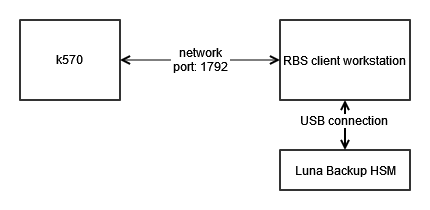
You must install the Remote Backup Server (RBS) on a workstation. RBS acts as a client to the Luna Backup HSM, and the Luna PCIe HSM acts as a client to RBS. RBS connects to the Luna Backup HSM through a local USB connection. The k570 PCIe HSM uses the vtl utility to connect to RBS over port 1792.
Establish connections
Use the provided USB cable to connect the Luna Backup HSM to the client workstation.
Install Luna HSM Client on your client workstation, including the Backup component.
Find the rbs program included in the Luna client installation.
The default path on Windows is
C:\Program Files\SafeNet\LunaClient\rbs.exe, and the default path on Linux is/usr/safenet/lunaclient/rbs/bin.Run the command
rbs --configto select the Luna Backup HSM device.When you have specified your selection, enter X to exit the configuration tool.
If a server key and password don't exist for RBS, generate a new key with command
rbs --genkeyand enter a new RBS password when prompted.The certificate is generated in:
Linux/UNIX:
<LunaClient_install_directory>/rbs/server/server.pemWindows:
<LunaClient_install_directory>\cert\server\server.pem
Start the rbs server on port 1792 with the command
rbs s -port 1792. Enter the RBS password that you created in the previous step.Securely transfer the
server.pemcertificate on the client workstation to the CipherTrust Manager k570 usingscp. The certificate is located atC:\Program Files\SafeNet\LunaClient\certs\server\server.pem.SSH into the CipherTrust Manager k570 as ksadmin.
Change into the directory containing the vtl utility. The vtl utility is located at
/usr/safenet/lunaclient/bin/vtl.Use vtl to connect the Luna PCIe HSM to the RBS client workstation.
./vtl addserver -n <client_workstation_ip_address> -c <path_to_the_server.pem>Verify the Luna Backup HSM is visible with vtl.
./vtl listservers
Back up the Root of Trust Keys
Establish connections between all the devices, client workstation, source k570, and Luna Backup HSM.
Still in an SSH session as ksadmin, execute "
/usr/safenet/lunaclient/bin/lunacm" utility.Identify the three visible slots, and note the displayed
Slot Idfor each slot. TheSlot Descriptionfield indicates each slot's purpose.User Token Slotcontains the k570 root of trust keys, and is the authorization point for access to the keys.Admin Token Slotis the slot for configuring Luna PCIe HSM overall.Net Admin Token SLotindicates the Luna Backup HSM device.
Switch to the slot for the
User Token Slot.slot set -s <user_token_slot_id>Login as the Crypto Officer. Use the password or challenge secret configured during deployment.
role login -n co -p <crypto_officer_password>Backup the partition contents, including root of trust keys, to the Luna Backup HSM. This process creates a new partition on the Luna Backup HSM. You set a security officer password for the Backup HSM, and set a partition name, cloning domain, and partition password for the new partition.
partition archive backup -s <net_admin_token_slot> -partition <a_backup_partition_name> -do <cloning_domain_name> -sop <backup_hsm_security_officer_password> -pas <partition_password_on_backup>
Restore the Root of Trust Keys to a Different k570 Appliance
Caution
Ensure the k570 appliance meets the required target Thales CipherTrust Manager k570 configuration. Failing to meet can result in the CipherTrust Manager application becoming unavailable after reboot, requiring customer support to recover.
Establish connections between all the devices, client workstation, target k570, and Luna Backup HSM.
Still in an SSH session as ksadmin, execute "
/usr/safenet/lunaclient/bin/lunacm" utility.Identify the three visible slots, and note the displayed
Slot Idfor each slot. TheSlot Descriptionfield indicates each slot's purpose.User Token Slotis the target slot which will contain the k570 root of trust keys, and act as the authorization point for access to the keys.Admin Token Slotis the slot for configuring Luna PCIe HSM overall.Net Admin Token SLotindicates the Luna Backup HSM device.
Switch to the slot for the
User Token Slot.slot set -s <user_token_slot_id>Login as the Crypto Officer. Use the password or challenge secret configured during deployment.
role login -n co -p <crypto_officer_password>Restore the root of trust keys from the backup device slot. Provide the backup HSM's partition name, cloning domain, security officer password, and partition password values set during backup.
partition archive restore -s <net_admin_token_slot> -partition <the_backup_partition_name> -do <cloning_domain_name> -sop <security_officer_password> -pas <partition_password_on_backup>Proceed to configure the Luna PCIe as the Root of Trust.
You require the 'partition-label' and the 'partition challenge' created during the HSM initialization procedure.
Note
If your backup file contained multiple root of trust keys, by default the oldest root of trust key becomes active.
(Optional) If you have restored multiple root of trust keys, you can rotate the active key to the newest root of trust key, if desired.