Web integration
The OneWelcome Identity Platform provides the necessary integration of FIDO authentication through customizable authentication journeys and login flows, providing passkey registration and authentication without any custom development.
This web integration documentation is needed only if you have specific integration requirements to implement your own user journeys through the FIDO server APIs. This web integration documentation provides comprehensive information about integrating FIDO authentication into your web applications using the WebAuthn API.
Note
The FIDO2 Web SDK provides a higher-level JavaScript library that handles the WebAuthn API calls, Device Bound Key management, and FIDO2 Server format conversions for you. If you prefer to use a pre-built SDK rather than calling the WebAuthn API directly, see the Web SDK documentation instead.
- Web integration overview: Introduction to web FIDO integration and WebAuthn
- Enrollment: Implementing user enrollment in web applications
- Authentication: Implementing user authentication in web applications
Key features
The web integration supports:
- WebAuthn API for FIDO2 authentication
- Platform authenticators (Windows Hello, Touch ID, Face ID)
- Roaming authenticators (security keys, USB tokens)
- Passwordless authentication flows
- Multi-factor authentication scenarios
FIDO integration and WebAuthn
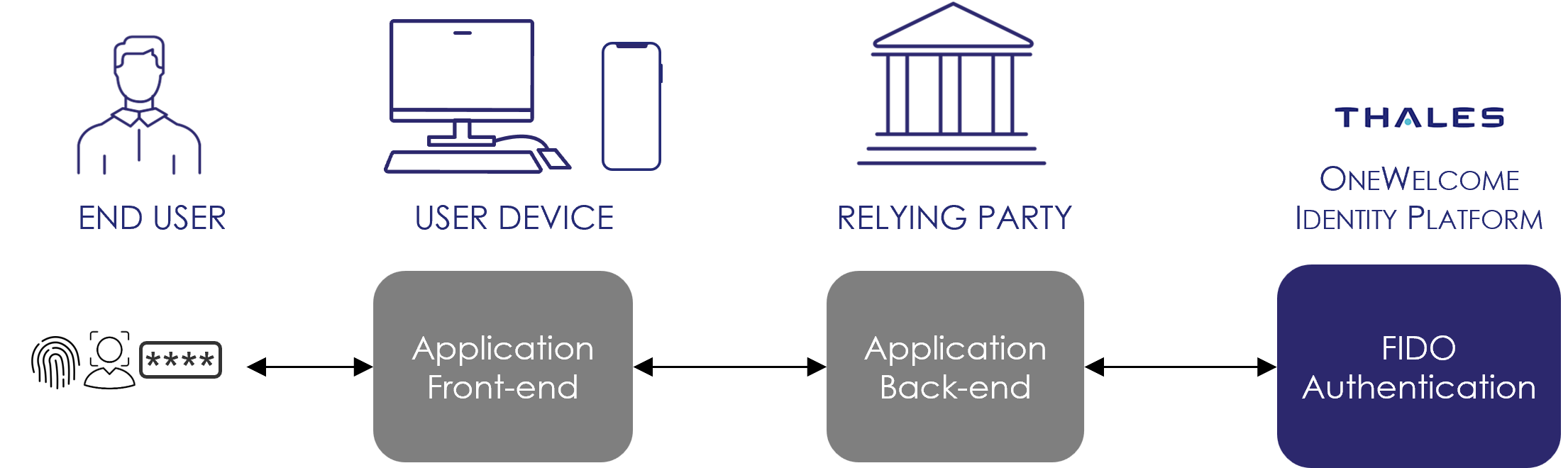
This section explains how to quickly integrate in-band FIDO authentication into your web application, using the standard WebAuthn API in your web pages, and the FIDO2 server APIs in the back end.
Your application is split into two parts:
-
The front end is the client-side web application composed of Javascript running in the user's browser, and accessing FIDO credentials through the WebAuthn API exposed by the browser. The front end communicates with the back end to exchange FIDO messages. It cannot communicate directly to FIDO server services.
-
The back end communicates on one side with the front end, and also with FIDO HTTP APIs. The back end manages the life cycle of the user credentials, and provides access to restricted resources or operations after successful user authentication.